Memory and the Wiki
A blank-slate agent is forgetful: it re-asks the same questions and re-discovers the same project quirks every session. Memory fixes that. The engine writes structured records during a session and reads them back the next time it starts, so the agent keeps context across sessions rather than starting cold each time.
Per-project memory in the engine
Section titled “Per-project memory in the engine”The engine’s memory is scoped per project. It captures what the agent saw, did, learned, and concluded, and it auto-indexes that across sessions. An index document is loaded into the system prompt when a conversation starts, so earlier decisions and context are present from the first turn.
Access is gated. Every read and write presents a token that the access gate checks against a partition and tier policy before any I/O, so a sub-agent cannot reach memory it should not. Memory is durable at the project level and, where configured, across projects, while session-only memory is discarded when the session closes.
The IJFW backbone
Section titled “The IJFW backbone”The desktop layers an IJFW memory backbone on top of the engine’s memory. It moves through clear lifecycle states (not installed, installing, installed) so the app can show whether the backbone is ready. This is the surface that the Memory page and the cross-session recall in the desktop build on.
Memory vs. the Wiki
Section titled “Memory vs. the Wiki”Memory and the Wiki are two distinct surfaces that work together. They serve different purposes and live at different routes in the desktop.
Memory (/memory) is the archive: the raw, time-stamped records the agent wrote during sessions. Each entry carries a type (decision, pattern, session, observation, preference, wiki), a project scope, tags, and a promotion score. You browse and filter the archive on the Memory page. The agent reads from it automatically; you can also add entries manually with Add or by dropping .md, .txt, or .json files into the page.
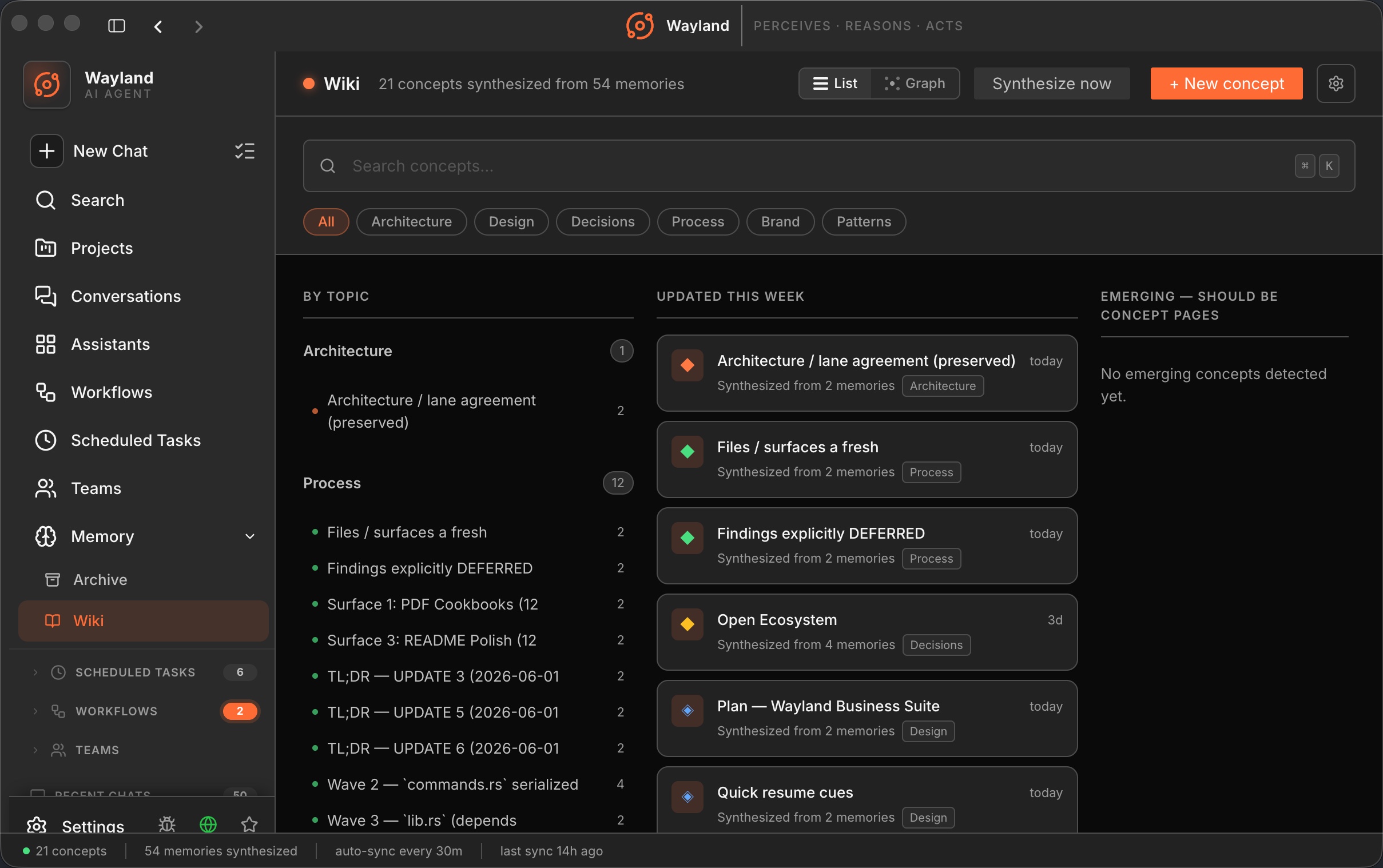
The Wiki (/wiki) is the synthesized knowledge surface: structured concept pages derived from groups of memory entries. Concept pages are not written directly by the agent during a session. Instead, a synthesis step reads Memory, identifies recurring themes, and produces a concept page with a title, TL;DR, body, topic tag (Architecture, Design, Decisions, Process, Patterns, Brand), and backlinks to other concepts. The Wiki auto-syncs every 30 minutes and can be triggered manually with Synthesize now.
The key distinction: Memory records what happened; the Wiki organizes what was learned into something browsable and navigable.
How entries move from Memory to the Wiki
Section titled “How entries move from Memory to the Wiki”A memory entry gains a promotion score over time based on how often it is referenced, its type weight, and a recency decay over 30 days. When the score reaches the promotion threshold (default 90), the entry is automatically promoted: it gets the wiki type and becomes source material for the next synthesis run. You can also promote an entry manually from the Memory inspector drawer. When synthesis runs, the engine groups promoted entries by theme and writes or updates the corresponding concept page.
Entries in the Wiki’s Emerging column (orphanCandidates) are themes cited in memory that do not yet have a concept page. You can trigger synthesis for a specific cluster from that column using the Synthesize page button.
The Memory page
Section titled “The Memory page”The Memory page is the main interface for the archive. It includes:
- A topbar with type-count chips (Memories, Decisions, Wiki), a streak indicator, quick-add, and import.
- A filter bar with full-text search (supports
type:decisionandtag:designmodifiers), project dropdown, time window, and type multi-select. - A list of entries with an inline inspector drawer (480px push-content, not an overlay) that opens when you select a row.
- A status bar showing the backbone health, the CLI entry count, and the last synthesis time.
The Wiki
Section titled “The Wiki”The Wiki is a separate page at /wiki. See Use the Wiki for how to open, browse, and edit it. For the concept of how the Wiki fits into the broader knowledge architecture, read on below.
The Wiki page shows:
- A three-column list view: By Topic, Updated this week, Emerging.
- A Most Referenced strip of the six most-cited concepts.
- A graph view (toggle in the topbar) showing concepts as nodes with backlink edges.
Each concept page shows the TL;DR, the full body with support for [[wikilink]] syntax, the source memory entries the synthesis drew from, backlinks from other concepts, and related concepts. From the detail page you can edit the concept, trigger a re-synthesis from its sources, or mark it as reviewed.
Concept pages are stored as Markdown files under .ijfw/wiki/<slug>.md in the project directory.