Settings: Skills
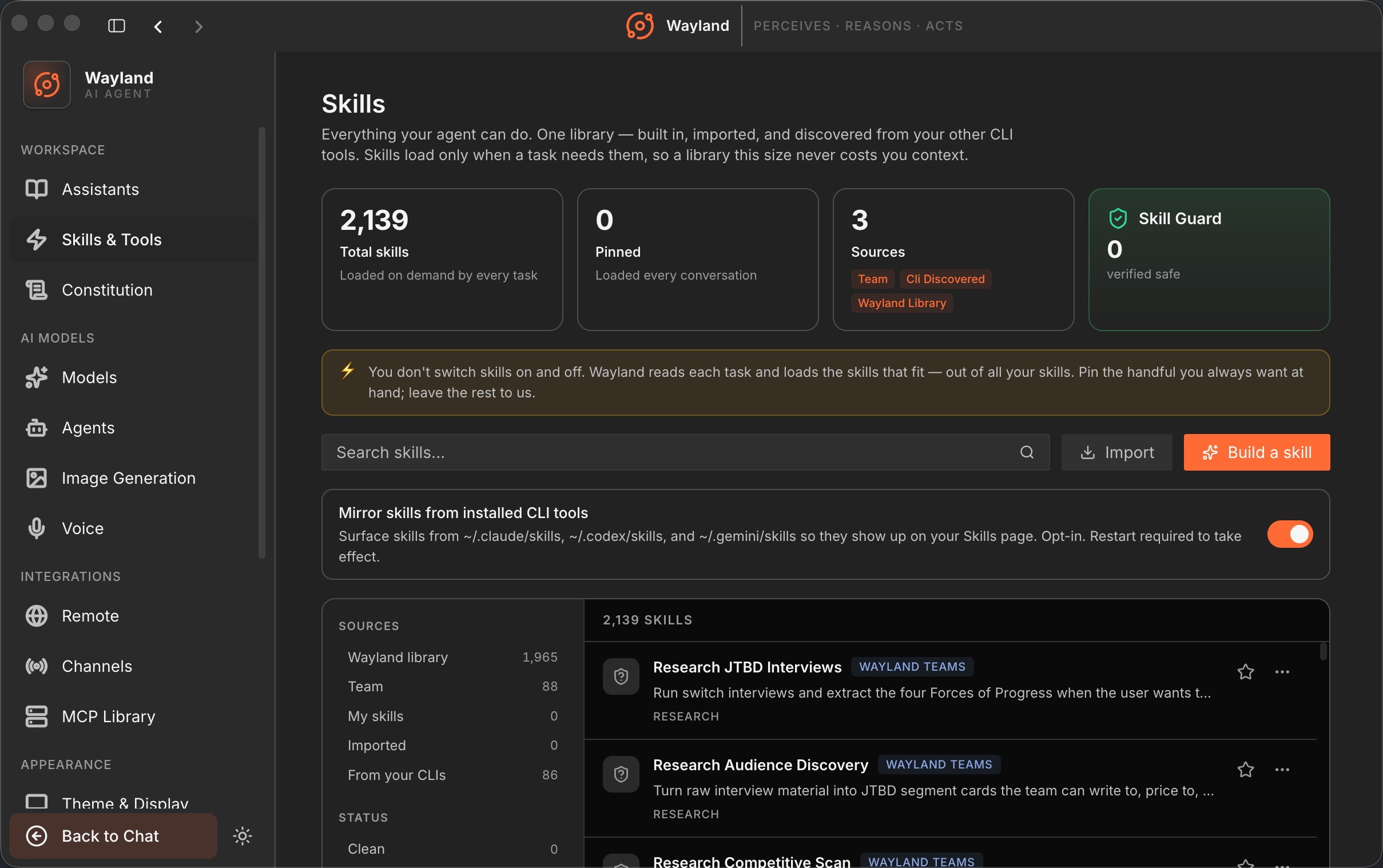
The Skills panel (/settings/skills) is your full skill library: built-in skills, skills you have imported, and skills discovered from other CLI tools. Skills load only when a task needs them, so a large library does not cost you context. You do not switch skills on and off here. Pin the ones you always want at hand and let Wayland select the rest per task.
Library health
Section titled “Library health”A summary strip at the top reports totals sourced from ipcBridge.skills.stats: total skill count, pinned count, and security scan state.
Search and actions
Section titled “Search and actions”| Control | Description |
|---|---|
| Search | Filter the list by name or description. Accepts a ?q= query parameter, so other pages (such as Workflows) can deep-link to a pre-filtered view. |
| Import skills | Adds skills from a folder, git repo, zip archive, or a single SKILL.md file. The picker UI ships in a follow-up pass; the underlying IPC routes (ipcBridge.skills.import.*) are already wired. |
| Build | Opens the Build Skill modal to author a new skill inline. |
Notice banner
Section titled “Notice banner”When at least one skill is loaded, a banner explains the load model: Wayland reads each task and selects matching skills automatically. Only pin skills you want available for every task.
Filter rail
Section titled “Filter rail”The left rail narrows the visible list. An empty selection means no filter is applied (all entries shown).
| Filter | Values |
|---|---|
| Source | builtin, custom, extension, discovered |
| Verdict | Security scan result (scanned, unscanned, or other values from SkillVerdict) |
| Category | The skill’s declared metadata.category |
Skill rows and detail drawer
Section titled “Skill rows and detail drawer”Each row shows the skill name, description, source badge, and a pin toggle. Selecting a row opens the detail drawer, where you can read the full skill content and toggle the pin. Pin state is written via ipcBridge.skills.setPinned.
CLI discovery
Section titled “CLI discovery”| Control | Description |
|---|---|
| Mirror skills from installed CLI tools | Opt-in toggle. When enabled, surfaces skills from ~/.claude/skills, ~/.codex/skills, and ~/.gemini/skills. Off by default. Discovery runs once at boot; a restart is required after toggling. State is persisted via ipcBridge.skills.setCliDiscoveryEnabled. |
Deep links
Section titled “Deep links”| URL | Behavior |
|---|---|
/settings/skills | Opens the Skills panel. |
/settings/skills?q=<term> | Opens the panel with the search field pre-filled. |
/settings/skills-hub | Redirects to /settings/skills. |