Connect Claude
There are two ways to use Anthropic’s Claude in Wayland:
- A Claude subscription, through the official Claude Code command-line tool. No API key, no separate billing. This is the recommended path if you already pay for Claude.
- An Anthropic API key, billed per use through your Anthropic account.
Wayland never runs its own Anthropic sign-in. The subscription path works because Claude Code is Anthropic’s own client and signs in with its own login; Wayland simply uses that session.
Option 1: Use a Claude subscription (Claude Code)
Section titled “Option 1: Use a Claude subscription (Claude Code)”Claude Code is Anthropic’s official command-line tool. It signs in with your Anthropic account and uses your Claude plan. Wayland detects Claude Code on your system and talks to it as an agent, so your conversations run on your subscription with no API key.
Step 1: Install the Claude Code CLI
Section titled “Step 1: Install the Claude Code CLI”Install it with npm:
npm install -g @anthropic-ai/claude-code(You can also use Anthropic’s native installer. See the official instructions at https://docs.claude.com/claude-code.)
Step 2: Sign in
Section titled “Step 2: Sign in”Run the CLI once and complete the login in your browser:
claudeSigning in here uses your Claude subscription. Wayland does not ask for these credentials and never sees your Anthropic password; the claude tool keeps its own session.
Step 3: Let Wayland detect it
Section titled “Step 3: Let Wayland detect it”Open Wayland and go to Settings > Agents. Wayland looks for the claude command on your system and lists it automatically. Claude Code appears under Your agents with an Active or Detected badge and the note “Anthropic’s coding agent. Signs in with its own account.”
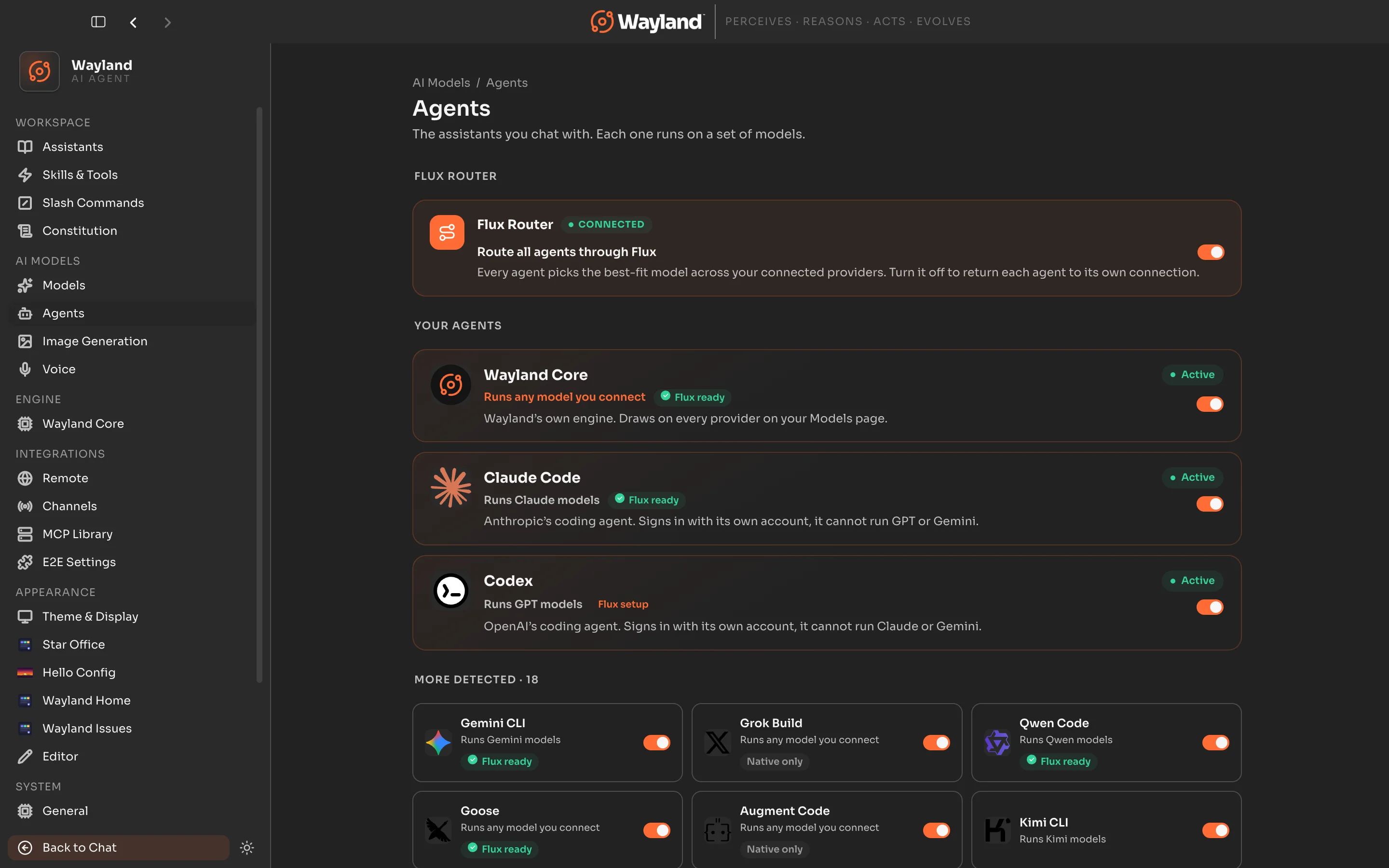
Step 4: Show it in the agent toolbar
Section titled “Step 4: Show it in the agent toolbar”On the Claude Code row, make sure Show in toolbar is on. This puts Claude Code in the agent toolbar above the message box so you can pick it for any conversation.
Step 5: Chat with Claude
Section titled “Step 5: Chat with Claude”Start a new chat, choose Claude Code from the agent toolbar, and send a message. Wayland runs the turn through the Claude Code tool on your subscription.
Why there is no “Sign in with Anthropic” button
Section titled “Why there is no “Sign in with Anthropic” button”Using an Anthropic subscription outside Anthropic’s official clients is against Anthropic’s terms, so Wayland does not offer its own Anthropic sign-in. Claude Code is Anthropic’s official client, so connecting it as an agent keeps you within those terms. This is the supported way to use a Claude plan in Wayland.
Option 2: Use an Anthropic API key
Section titled “Option 2: Use an Anthropic API key”If you would rather pay per use, connect an Anthropic API key directly.
- Create a key at https://console.anthropic.com.
- In Wayland, open Settings > Models and find Anthropic in the provider grid.
- Choose Manage, paste your API key, and save. Anthropic shows as connected.
- Set a default Anthropic model, or pick one per conversation.
With an API key, Wayland talks to the Anthropic API directly and usage is billed to your Anthropic account, separate from any Claude subscription.
Which should I use
Section titled “Which should I use”- Claude subscription (Claude Code): best if you already pay for Claude and want it included in that plan. Runs Claude models through Anthropic’s own tool.
- API key: best for pay-as-you-go usage, or when you want Anthropic models available to Wayland Core and every assistant without launching the Claude Code agent.